System Volume Calculator


This calculator estimates the volume of water in your aquarium by noting the change in salinity that occurs when a known quantity of freshwater is added.

To use this calculator, first measure the salinity of your system. Then, add a known amount of RODI freshwater and let it mix thoroughly with your system water. This usually takes between 10 and 60 minutes depending on your setup. After the water has mixed, test your salinity again.

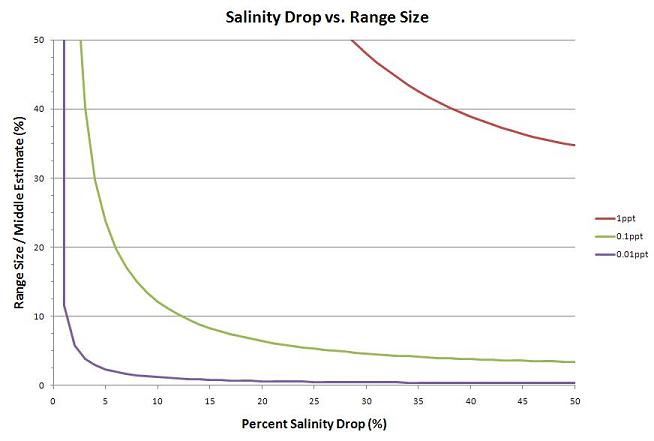
To get a reasonable estimate from this calculator with a salinity measuring accuracy of 0.1ppt, you will need to add enough RODI water to cause around a 12% drop in salinity. If your salinity measuring accuracy is 0.01ppt, you will only need around a 2% drop in salinity ( ).

The accuracy of this calculator can always be increased by creating a larger salinity drop (up to 50%) and/or using a better salinity measuring device. However, keep in mind that too large of a drop in salinity can have a detrimental effect on your tank inhabitants.

This graph shows how the size of the estimated volume range falls sharply as the percent salinity drop increases. The purple line is for salinity measurements that are ± 0.01ppt, the green line is for salinity measurements that are ± 0.1ppt, and the red line is for salinity measurements that are ± 1ppt.

Initial Salinity:
 

Amount of Freshwater Added:
 

Final Salinity:
 

Accuracy of Salinity Readings:


Estimated Volume*:
 

Minimum Estimated Volume*:
 

Maximum Estimated Volume*:
 

*These are estimates of the original water volume, not including the freshwater just added.